Subject
What holds attention, what it is doing, and which traits must remain recognizable.
AI image analyzer
See how an image is built across nine visible layers. The AI image analyzer focuses on creative direction: subject, composition, light, color, camera feel, materials, style, and mood. It returns a visual report—not a generation prompt.
Creative analysis only. This is not an EXIF reader, AI detector, biometric tool, or medical service.
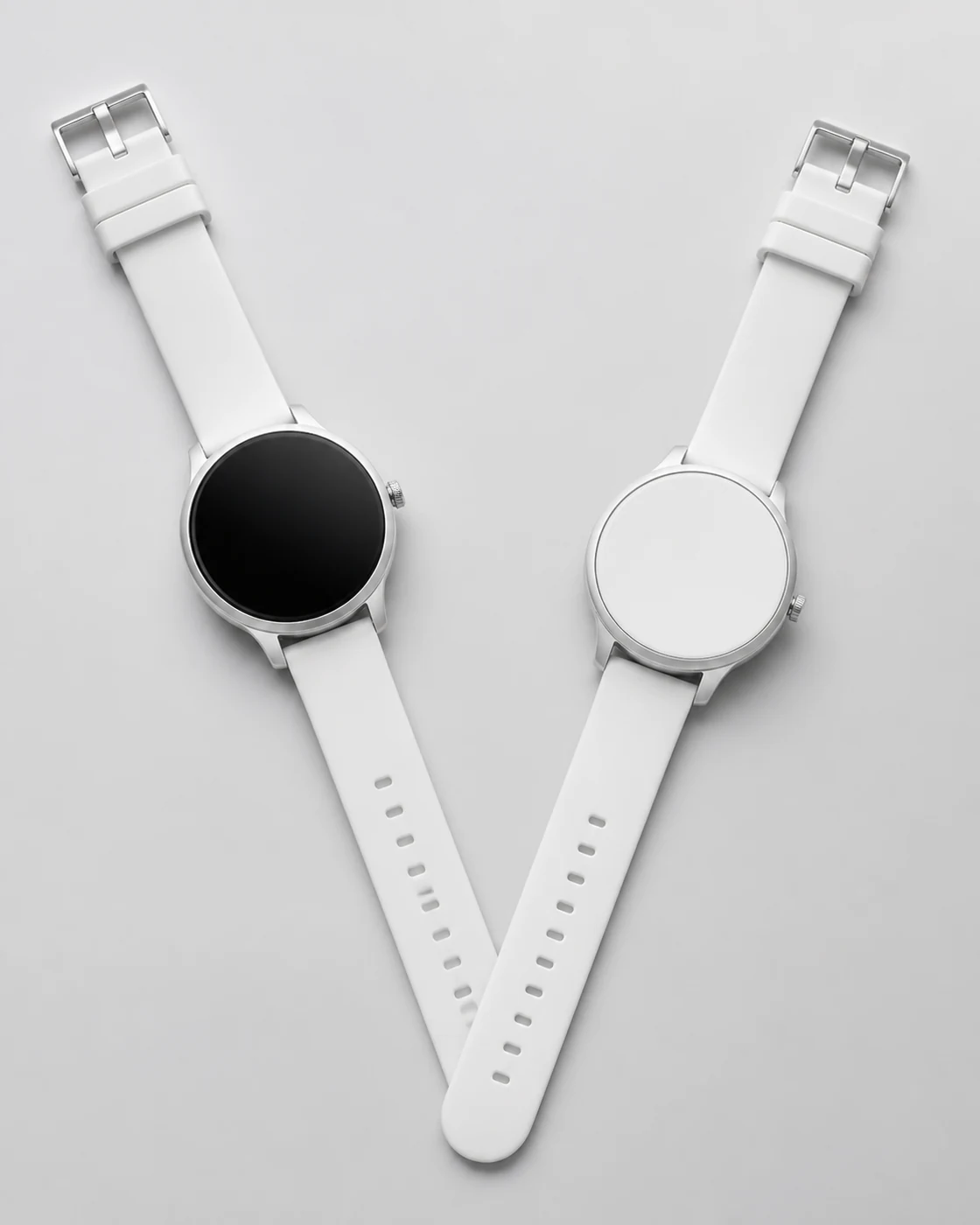
Reference image
Minimal product study
Analyze your reference
One credit returns a complete nine-layer visual report. No model-specific prompts are generated or added to Prompt History.
No image selected
Add an image to inspect nine visual layers.Subject · Environment · Composition · Lighting · Color · Camera · Materials · Style · Mood
Stay here for the nine-layer visual report. If you need generation instructions instead, switch to the prompt workflow and copy the model-ready result.
A useful reading has a purpose
“A picture of two watches” tells you what the file contains. It does not tell you why the product looks quiet and expensive. That effect comes from a centered top-down view, a narrow neutral palette, controlled metal reflections, a soft contact shadow, and enough empty space for the objects to breathe. The AI image analyzer names those decisions so they can be questioned, kept, or changed.
This makes the AI image analyzer useful beyond description. A designer can separate material from composition, a creator can keep the light while replacing the product, and a photographer can compare camera distance. The report turns visible choices into controls.
Camera labels remain estimates. “85 mm product lens” describes perspective and compression; it does not prove which lens captured the source.
Visual deconstruction
Each layer answers a different creative question. Their value comes from reading them together: light reveals material, composition directs attention, and color changes the emotional effect of the same subject.
What holds attention, what it is doing, and which traits must remain recognizable.
The setting, surrounding objects, depth cues, weather, architecture, and spatial context.
Framing, balance, viewpoint, subject placement, visual weight, crop, and negative space.
Direction, softness, contrast, reflections, shadow behavior, time of day, and atmosphere.
Dominant hues, temperature, saturation, contrast pairs, tonal range, and palette restraint.
Angle, apparent focal length, perspective, depth of field, focus falloff, and image distance.
Surface texture, transparency, gloss, grain, fabric, metal, glass, skin, paper, or stone.
Photography, illustration, 3D, anime, watercolor, editorial, commercial, or concept-art language.
The emotional effect created by the other layers, expressed without replacing observable detail.
Clearly legible text is recorded alongside these layers when present. It remains a supporting observation because the AI image analyzer is not a document transcription service. Always verify important names, prices, labels, and legal wording against the source image.
Choose the right kind of tool
These tools all accept images, but they answer different questions. An AI image analyzer explains the visible decisions inside the source. An image prompt analyzer turns those cues into generation language. Use this comparison to choose the output that matches the job rather than treating the names as interchangeable.
| Tool type | Main output | Best use |
|---|---|---|
| Creative image analysis | A nine-layer visual reading of the image in front of you. | Understanding, reviewing, and discussing creative direction. |
| Image prompt analyzer | A generation-oriented description or prompt reconstructed from visible cues. | Recreating a look in an AI image model rather than studying it. |
| Image captioner | A short natural-language summary of visible people, objects, and actions. | Basic description, cataloging, or an alt-text draft. |
| OCR tool | A transcription of printed or handwritten characters. | Documents, receipts, signs, and text extraction. |
| EXIF viewer | Metadata stored in the original file, when the fields still exist. | Checking recorded camera and export information. |
| AI detector | Provenance signals, watermark checks, metadata clues, or a probability-style screen. | Authenticity review with additional evidence. |
If your question is “how can I reuse this lighting and composition in a new AI image?”, choose the creative analysis report. If your question is “was this file generated by AI?”, preserve the original file and use provenance and detection methods designed for that task.
Need prompts? Open the ChatGPT Image Prompt workflow. This page stays analysis-only.
Observe, verify, then decide
The tool is fastest when you know what decision follows the analysis. Use this sequence to keep the output tied to the image and avoid accepting a polished-sounding description before checking its evidence.
Upload the clearest allowed version of the image. The AI image analyzer first names the visible subject and setting, then reads arrangement, light, surfaces, and color. “Cinematic” alone says very little; low-key side light, deep background separation, and a narrow warm palette explain what creates that effect.
Ask whether the composition supports the mood, whether the light reveals the material, and whether the camera distance matches the subject. If one layer conflicts with what you see, compare it directly with the reference. A specific correction is more useful than a broad request for “more detail.”
Use the report to identify one relationship worth preserving and one worth changing. You might keep soft side light because it reveals the material, then loosen a centered composition that feels too formal. The report supplies evidence for that decision without prescribing a generation prompt.
Copy the nine-layer reading into a project brief, review note, or shot list while the source image is still available. Keeping the observations beside the reference makes later discussion more precise than saving a detached style label.
Follow the causal chain
Consider the white wristwatch reference. The subject is simple, but simplicity alone does not produce the result. The overhead viewpoint flattens the objects into clean geometry. The mirrored V arrangement creates balance. Diffused light keeps the silver cases readable without harsh hotspots, while the pale surface lets the black watch face become the strongest contrast.
Material, composition, and light are therefore connected. If a creative brief says “brushed metal” but pairs it with hard direct flash, the reflection pattern may become busy and the premium restraint disappears. The report is most useful when its layers reveal this dependency, because you can preserve the relationship even after replacing the watch with headphones or a fragrance bottle.
Mood sits at the end of that chain. “Quiet” is not a magic style word. It is the result of limited color, stable symmetry, soft transitions, uncluttered surroundings, and controlled contrast. An AI image analyzer that lists mood without the choices that create it leaves the user with a label instead of direction.
Boundaries protect the work
The analysis is generated by a vision model and can miss objects, misread text, overstate a style label, or infer the wrong lighting setup. Review it before you use it in client work. An AI image analyzer can make visual evidence easier to discuss; it does not replace professional judgment where mistakes carry real harm.
Do not use the result for diagnosis, identity verification, copyright ownership decisions, legal conclusions, or authenticity proof. The service does not reveal hidden layers, deleted metadata, private information, or the exact prompt that created a generated image. If provenance matters, examine the original file, its Content Credentials, source context, and corroborating records.
Uploaded images are processed to provide the requested analysis. Analysis-only results are not added to Prompt History or kept as Prompt History thumbnails. Treat the report as a working observation, not a permanent source record. Use material you have permission to process and read the Privacy Policy for retention and deletion details.
Questions about the analysis
An AI image analyzer examines visible choices: subject, environment, composition, lighting, color, camera look, materials, style, mood, and clearly legible text. The result is a nine-layer visual report, not an image-generation prompt. It describes the pixels you provide and does not recover private production data.
No. This AI image analyzer supports creative visual breakdown, not authenticity screening. It does not calculate an AI probability, validate Content Credentials, inspect C2PA signatures, or determine who created an image. Use provenance tools and the original file when authenticity matters.
No. Camera descriptions are visual inferences such as “telephoto portrait look,” “top-down product view,” or “shallow depth of field.” The report does not claim that a named lens, aperture, shutter speed, or lighting instrument was physically used. Exported images often omit that information anyway.
It can report clearly visible text as part of the structured analysis, but it is not a dedicated OCR service and should not be used to transcribe long documents. Small, stylized, blurred, rotated, or partly hidden lettering may be missed or read incorrectly. Check important wording yourself.
Upload one image or add a public image URL, then select Analyze 9 Layers. The complete report appears on the same page with separate entries for subject, environment, composition, lighting, color, camera look, materials, style, and mood. You can copy the report when you need it in a creative brief.
Do not use this report for medical diagnosis, biometric identification, legal evidence, safety decisions, or hidden-personal-data discovery. Upload only images you have permission to process. For creative work, use a clear reference where composition, light, color, and materials can be seen.
Put the visual reading to work
Upload one image, review the creative evidence, and copy the nine-layer report into your next brief or critique. If your job is focused on converting photography into model-ready prompt language instead, use the Photo to Prompt generator. For visual references across photography, 3D, watercolor, anime, and concept art, browse the analyzed example library, or return to the free Image to Prompt generator for all six model-ready outputs.